Artwork Requirements
Everything you need to know about preparing artwork for professional decoration
Vector vs. Raster Art
Understanding the difference is crucial for achieving the best decoration results
Vector Art
✓ Preferred
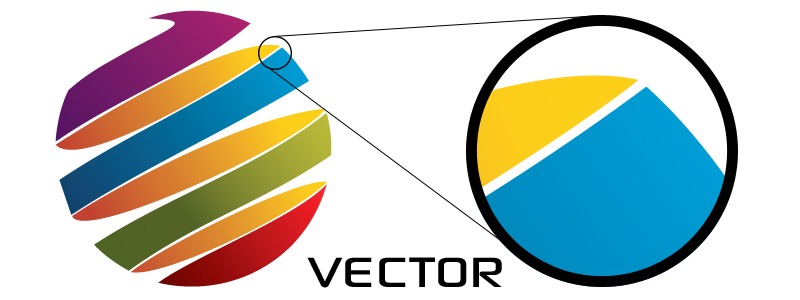
Scalable to any size without quality loss
- Infinitely scalable without pixelation
- Crisp, clean edges at any size
- Easy to separate colors for screen printing
- Required for embroidery digitizing
File Formats:
AI, EPS, PDF, SVG
Raster Art
⚠ Limited Use
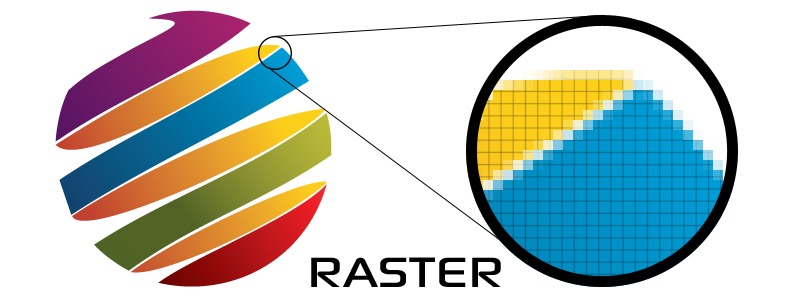
Made of pixels - becomes blurry when scaled
- Pixelates when enlarged
- Quality depends on resolution (DPI)
- Difficult to edit and separate colors
- Not ideal for screen print or embroidery
File Formats:
PNG, JPG, TIFF, BMP
⚠ Requires 300+ DPI at print size
Requirements by Decoration Method
Each decoration method has specific artwork requirements for optimal results
Screen Printing
ARTWORK TYPE
Vector art strongly preferred. Each color must be on a separate layer.
FILE FORMATS
AI, EPS, PDF (with outlines), high-res PNG (300+ DPI)
Simple, solid colors work best. Gradients and complex details may not reproduce well.
Direct-to-Film (DTF)
ARTWORK TYPE
Vector or high-resolution raster art. Full-color designs welcome.
FILE FORMATS
AI, EPS, PDF, PNG, JPG (300+ DPI minimum)
Great for photo-realistic designs. Printed in CMYK - some bright colors may be out of gamut.
Embroidery
ARTWORK TYPE
Vector art required. Will be converted to digitized embroidery file (DST).
FILE FORMATS
AI, EPS, PDF (with outlines)
Keep designs simple. Small text and fine details don't embroider well. Minimum 5mm letter height.
What is Embroidery Digitizing?
Embroidery digitizing is the process of converting your artwork into a specialized embroidery file (DST format) that tells the embroidery machine exactly where to place each stitch.
The Process:
- 1.Your vector artwork is analyzed
- 2.Stitch types and directions are determined
- 3.Thread colors are assigned
- 4.File is optimized for embroidery machines
Important Notes:
- First-time digitizing fee applies for new designs
- Digitizing fee is waived for repeat orders
- Complex designs may cost more to digitize
- Small text and fine details may need to be simplified
Convert Fonts to Outlines
Always convert text to outlines (or curves) before sending artwork. This is critical for accurate reproduction.
Why It Matters:
- • Font files may not be available on our systems
- • Different font versions can cause layout shifts
- • Text may appear differently or be missing
- • Prevents production delays and errors
How to Convert:
- Adobe Illustrator: Type → Create Outlines
- CorelDRAW: Arrange → Convert to Curves
- Inkscape: Path → Object to Path
- PDF: Save with fonts embedded or outlined
Color Matching Guide
Understanding color limitations for each decoration method
Screen Printing
Inks can be custom color-matched to Pantone (PMS) colors or other color systems. This provides excellent color accuracy for brand colors and logos.
Limitations:
- • Metallic and fluorescent inks have different appearance properties
- • Color may vary slightly on different fabric colors
- • Screen print produces solid colors - gradients require halftones
- • Each color requires a separate screen (affects cost and setup)
Embroidery
Thread colors are matched to the closest available Pantone color. While we have a wide selection of thread colors, there are far fewer thread colors than Pantone colors.
Important Notes:
- • Thread colors cannot be custom mixed or adjusted
- • We match to the nearest available thread color in our inventory
- • Some Pantone colors may not have a close thread equivalent
- • Thread appearance changes based on lighting and fabric texture
- • We'll always get approval before production if color match is approximate
Direct-to-Film (DTF)
DTF uses CMYK printing (Cyan, Magenta, Yellow, Black) to create full-color images. This is the same color system used by most printers.
Color Gamut Limitations:
- • Bright, vibrant colors (like neon or fluorescent) are out of gamut
- • Some Pantone spot colors cannot be accurately reproduced in CMYK
- • Metallics and special effects cannot be printed
- • Colors may appear slightly different than on-screen due to CMYK limitations
- • Best for full-color photos and designs where exact color matching isn't critical
Tip: If brand color accuracy is critical, screen printing or embroidery may be better options than DTF.
Questions About Your Artwork?
Not sure if your files are ready? Contact us and we'll review your artwork at no charge.
Contact Us